

You already use Level All to help students plan for careers, college, and life after high school. Now, you can make that learning even more hands-on by adding Adobe Express for Education.
With Adobe Express for Education, students implement professional design tools to turn Level All lessons into finished work they can actually utilize, like a polished resume or a flyer for a service project. And because it connects right to the Level All dashboard you already use, getting started takes just a few minutes.
How to Get Started
Your school’s Level All admin turns on Adobe Express for Education, and it only takes a few minutes.
If you’re a teacher. Look for the yellow banner at the top of your Level All screen. It’s your reminder to reach out to your school’s Level All admin, who can activate Adobe Express for Education for your whole school.
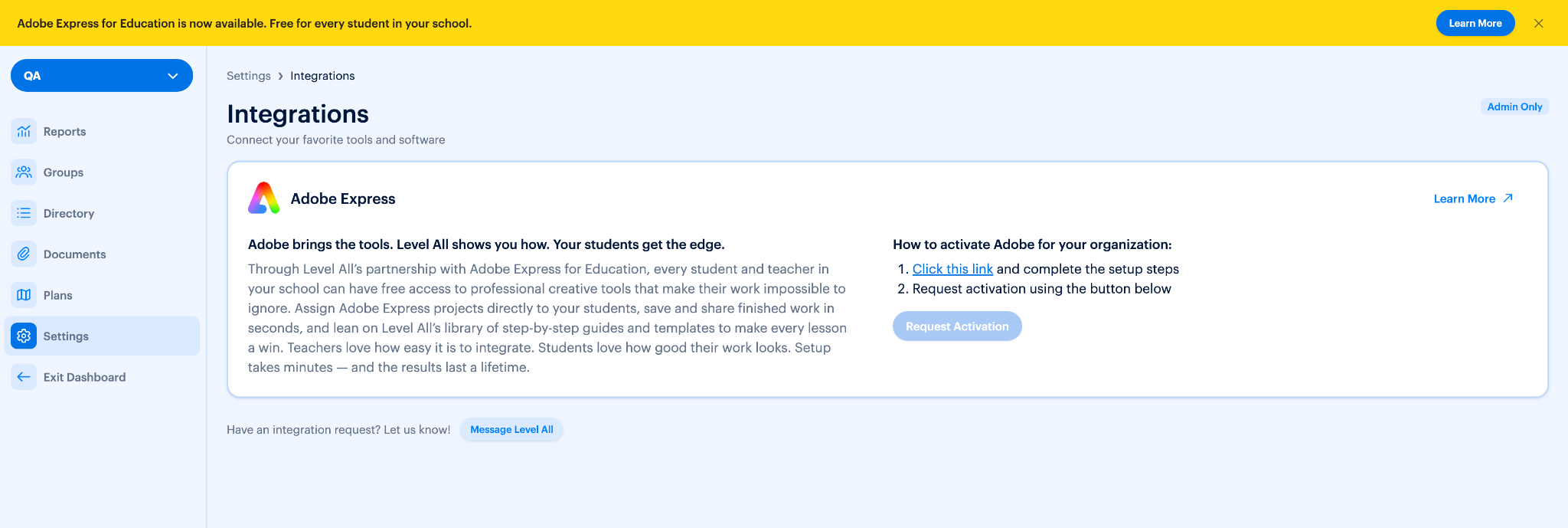
If you’re an admin. You’ll see a yellow banner too, with a Learn More button. Here’s what to do from there:
- Click Learn More. You’ll find it in the yellow banner at the top of your screen. You can also get there anytime by going to Settings and clicking Integrations.
- Click the Adobe Express for Education link. This opens the setup for your school.
- Complete the setup steps. Follow the prompts on screen. Each one walks you through exactly what’s needed.
- Tap “Request Activation.” That’s it. Your request is on its way to our Success Team.
Put It to Work With Your Students
Once Adobe Express for Education is active, your students can complete Level All’s Adobe Express Projects. They don’t just read about a skill. They use real design tools to create something they can put to work. Here are just a few examples:
- Write the Perfect Resume with Adobe Express for Education Students pick a template, add their experience and skills, and download a polished resume they can hand to an employer, a coach, or a college.
- Getting a Part-Time Job in High School with Adobe Express for Education Students create professional application materials that help them stand out when they go after their first job.
- Make an Impact Through Community Service with Adobe Express for Education Students design eye-catching materials to promote and share their service projects, so their work reaches more people.
Why It Matters
Students engage more when they’re making something real. These activities turn career and college readiness lessons into hands-on creations students are proud to share.
- More engagement. Creating a resume or a project flyer feels very different from filling out a worksheet.
- Real-world results. Students walk away with finished work they can use right away, not just notes.
- One place for everything. The guidance lives in Level All, the design tools connect right to it, and your SIS keeps sign-up simple.
Ready to get started?
Teachers, send your Level All admin a quick note. Admins, click Learn More on the yellow banner and request activation today.
Questions? Reach out at success@levelall.com.
