

Partnering with Adobe Express for Education sounds like a big project. It isn't. Adobe Express for Education is free for Level All users, and if your school uses Level All, you're already most of the way there. Your admin makes four clicks, and students get professional design tools right inside their Level All projects.
Here’s the Whole Process. Really.
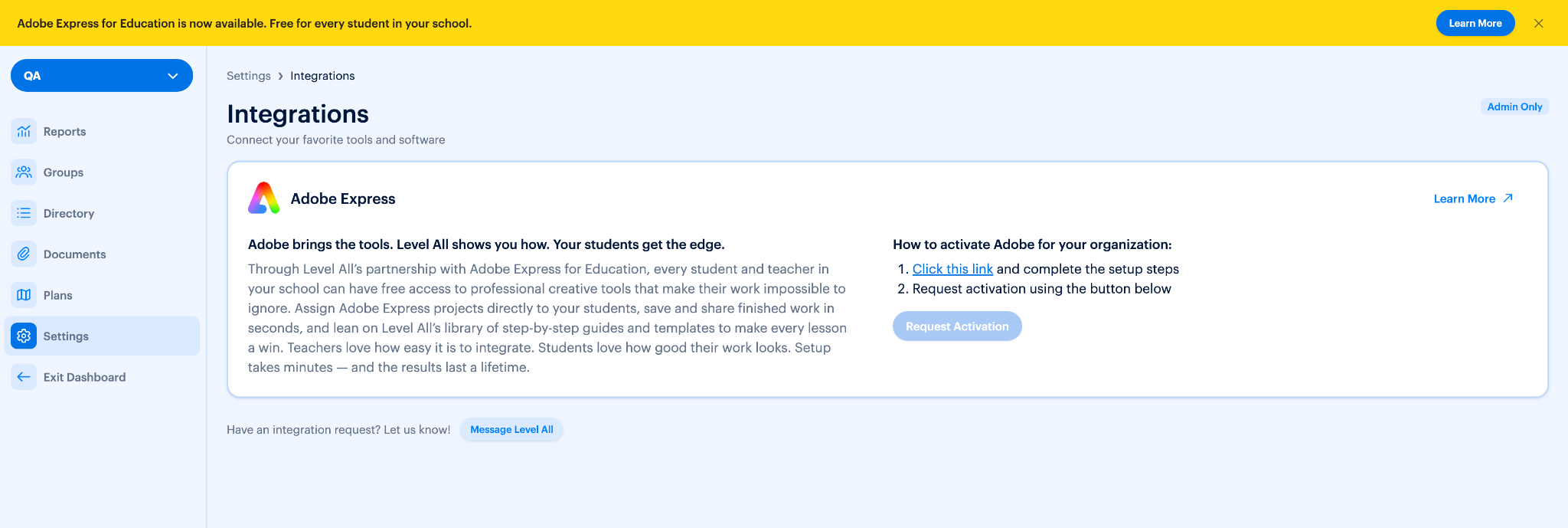
Admins. Look for the yellow banner at the top of your Level All screen. Then:
- Click Learn More in the yellow banner. You can also find it anytime under Settings > Integrations.
- Click the Adobe Express for Education link to open your school’s setup.
- Follow the on-screen steps. Each one tells you exactly what’s needed.
- Tap “Request Activation.” Done. Your request is on its way to our Success Team.
Level All already integrates natively with your school’s student information system (SIS), so adding Adobe Express for Education is seamless. There’s no separate roster to build and no student-by-student sign-up to manage.
Teachers. Not an admin? Spot the same yellow banner and send your Level All admin a quick note. That’s your part done.
What You Won’t Have to Do
- Build a roster. Level All already syncs with your student information system (SIS).
- Manage student sign-ups. Activation covers your whole school.
- Learn a new platform. Adobe Express connects right to the Level All dashboard you already use.
What Partnering Unlocks
- Hands-on projects. Students turn Level All lessons into resumes, job applications, and flyers they can actually use.
- Ready-to-teach lesson plans. Every Adobe Express project in Level All comes with a customizable lesson plan, including extension activities and pre-made slides.
- Free training from Adobe. Live streams, monthly classroom activities, and self-paced courses, led by former teachers.
Ready to Get Started?
Teachers, send your Level All admin a quick note. Admins, click Learn More on the yellow banner and request activation today.
Questions? Reach out at success@levelall.com.
